eobdtool.co.uk

eobdtool.co.uk
HOT

2017年9月30日星期六

Kess V2 EU Clone VE Kess V2 China Clone

Here are Kess V2 5.017 firmware EU clone and China clone.

So, how to tell your Kess v2 is an ECU version or a China version?
Kess V2 EU comes with a purple board and Kess V2 China with a green or red board. Look here:

Kess V2 EU clone: Purple PCB


source: http://mhhauto.com/Thread-EU-KESS-KTAG-NEW-PCB-S-FOR-2016-SPECIAL-SALE-THIS-WEEK

Kess V2 China clone: Green or Red PCB
The first


The second


The third one: the only one version with a token-reset button


The fourth


THE MOST IMPORTANT TIP:
Either kess EU or kess China isn’t original Alientech Kess V2. if you want kess v2 original, please go to http://www.kessv2-alientech.com/

You can use Kess v2 with relief to read or write ECUs
All kess work, esp. kessv2 china clones (tested 100%)
connected to the car, read data very fast. Works fine.

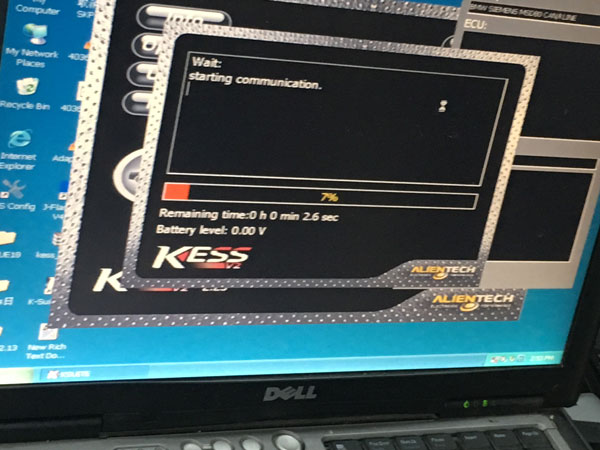
Look here: Kess v2 5.017 is working great with a 2007 BMW 323i 2500 24v N52B25, ECU: siemens msv80.


source:
Why Kess v2 5.017 firmware is populous now?

First, Kess v2 is the latest version. People usually are curious about new things.
Second, it has better stability when running
The last but the most important, it has the biggest compatibility with other versions:
- works on cars, trucks, tractors, bikes, not cars only
- No token limitation for ALL vehicles
(the old versions have token limitation on some models)
- FULL authorization of ALL software protocols: add 140 protocols in 5.017 version
(works well for EDC17/MED17/k-line/DSG/DQ200 DQ250 DQ500 Gearbox/ST10/Ford J1850 ….  !)


Credits to Laura collected all for us.

2017年9月28日星期四

KESS V2 FW 5.017 Ksuite 2.23 Software Installation Guide

Here is Ksuite 2.23 software installation guide for new KESS V2 Firmware 5.017 with unlimited tokens!
Below update KESS V2 FW 5.017 Ksuite 2.22 to Ksuite 2.23 step by step.

KESS V2 FW 5.017 software Ksuite 2.23 installation steps
Before installation, remember to disconnect all Internet work!
Step 1
Open KSuite 2.23 (E:) and run "ksuite_222_v2" exe.
 

To complete the setup, click "Next", "Next" then "Install".


Step 2
It will pop up a Microsoft Visual C++ 2005 License Terms, click "Yes" to continue.

Select language as "U.S English".

Click "Next" until "Finish" to complete Ksuite 2.22 setup wizard.

And choose "English".


Step 3
Back to KSuite 2.23 (E:) and open "Ksuite 2.23" folder.
Right click the "K-Suite" shortcut on desktop to choose "K-Suite Properties".

Delete all files in "KSuite" folder.

Then copy all files in "Ksuite 2.23" folder to "KSuite" folder.

Step 4
Now it will pop up a Found New Hardware Wizard.
Click "Next" then "Finish".

After that the USB Device is exist. (You can right click "My Computer"→ "Manage"→ "Device Manager")

Open K-Suite shortcut and now it's Ksuite 2.23 software!

Click "Info" button and check the firmware version is 5.017.
Now installation is complete, you can use this new KESS V2 FW 5.017 Ksuite 2.23for ECU chip tuning!


2017年5月4日星期四

KESS V2 K-Suite 2.33 Free Download and Installation Guide

Latest KESS V2 K-Suite 2.33 software free download link and K-Suite 2.33 Windows XP installation guide is here!
Ksuite 2.33 is tested OK to work with KESS V2 clone!

Free download KESS V2 K-Suite 2.33:
https://mega.nz/#!kspDBQBD!64ybgw57IriCYTQ_5WtUcqlsGMb2oKitY24IQD5F37U

Ksuite 2.33 is tested working on below KESS V2 clone:

How to install KESS V2 Ksuite 2.33 on WIN XP?
Step1. Go to “Network Connections” and disconnect all your networks. (Right click to choose “Disable”)
Download, unzip and open Ksuite 2.33 file.
You can see a folder "K-suite 2.33", find folder "KSuite v2.25- v2.33".
Copy K-suite 2.33 setup file to desktop.

Step2. Open and run K-suite 2.33 setup file on desktop, it will automatically pop up a K-suite Setup Wizard.
Click "Next" and "Install" then "Yes".
Select language: US English.
Click "Next" and "Finish".

Step3. Delete K-suite 2.33 setup file on desktop.
Right click K-suite 2.33 shortcut and choose "Properties".
Click "Find Target" button and you can see the KSuite folder.
Delete the "Help" folder.
And go back to folder "K-suite 2.33" and copy this "Help" folder to replace the original "Help" folder.
Step4. After that you can see a pop-up Found New Hardware Wizard.
Click "Next" then "Finish".
Now you successfully install Ksuite 2.33 software!
The Ksuite 2.33 USB Device exist. (Right click My Computer and choose Manage, go to Device Manager to check it)
Ksuite 2.33 software is now available to work with KESS V2!

2017年3月15日星期三

Ksuite V2.3.2 V2.28 V2.25 V2.23 V2.25 V1.89 Free Download on Mega

Eobtool is available with all version of KESS V2 Master Ksuite software V2.3.2 V2.28 V2.25 V2.23 V2.25 V1.89 free download on Mega, all tested OK and safe without virus, crack and no password.

Ksuite V2.3.2 free download (Safe):
OK on XP win7 8 10

Ksuite V2.28 free download (Safe):

Ksuite V2.23 free download (Safe):

Ksuite V2.25 free download (Safe):

Ksuite V1.89 free download (Safe and most stable):
Too large to upload, contact email at sales@eobdtool.co.uk if you need.

Who tested Ksuite?
http://www.eobdtool.co.uk engineers, 100% OK and safe to download.

Kess master Installation:
How to install Kess v2 v2.25 & v2.28 on Windows XP system?

How to install Kess V2 master Ksuite V1.89-V2.25

Test report:
Car - OK
Motorcycle - Fail, better use Fgtech V54
Update - not allowed
Connect network - Not allowed, Please disconnect the network before you install the software or use the device
PS: the comparison among MPPS, Kess, ktag-trasdata and Fgtech:

The compatible Kess V2 master hardware:
se87-c, car version, firmware V4.036, No Token Limitation, €89:

se87-k, truck version firmware V4.024, €64:

se87-ck, truck version firmware V4.036, €65:
This all KESS V2 tunning list: http://www.eobdtool.co.uk/producttags/kess-v2-tuning.html

2016年11月21日星期一

KESS V2 K-Suite 2.28 Free Download and Installation Guide

Good news for sharing! K-Suite 2.28 is now tested OK on KESS V2 Master Clone! You will get KESS V2 K-Suite 2.28 free download link and installation guide in this blog.

Free download KESS V2 K-Suite 2.28 in mega: (This link is shared at forum please try on your own risk)
1.     Just download RAR, unpack and put it in your ksuite folder
2.     Use Ksuite 2.28 without internet open
Which KESS V2 is compatible with K-Suite 2.28?
How to install KESS V2 KSuite 2.28 step by step?
The whole process can be devided into 3 parts:
Part1. Install Ksuite Setup 1.93
Part2. Copy all things in Ksuite 2.28 folder to Ksuite 1.93 folder
Part3. Run Ksuite 2.28 and make other settings
Step1. Go to “Network Connections” and disconnect all your networks. (Right click to choose “Disable”)

Open Ksuite V2.28 software RAR then Ksuite Setup 1.93.

Step2. Start to install Ksuite 1.93: Click “Next”→ “Install” → “Yes” → “U.S. English” → “Next” → “Next” → “Finish”

Choose “English”

Step3. Right click the Ksuite icon on desktop, choose “Properties” then click “Find Target”.

Delete all files in Ksuite 1.93 folder.
Step4. Open Ksuite 2.28 RAR file and copy all files to the blank Ksuite 1.93 folder.

Copy the “Help” folder to Ksuite 1.93 folder.

Step5. It will automatically show “Found New Hardware Wizard”, click “Next” and then “Finish”.

Now you can right click “Computer” icon→ choose “Manage” → “Device Manager” → “USB Controllers” and find the “USB Device” exist.

Step6. Click Ksuite icon to open Ksuite 2.28 software. Click “Options” you can select language.


Click the car icon you can start to use this K-suite 2.28 software you’re your KESS V2 ECU Programmer now!