eobdtool.co.uk

eobdtool.co.uk
HOT

2015年7月30日星期四

Got KESS v2 fw4.036 from China and test Peugeot Renault

2th April, 2015
Placed an order of kess v2 fw4.036 from obdtool.co.uk 212.49 plus ==shipping.
I ordered this one:

7th April, 2015
Arrived today my fw4.036 Kess V2, They do not supply the bin or hex file with firmware, token free they tell me, no jlink here.
Installed today, tomorrow I will try if it works on kline and can

9th April, 2015
Tested today with
Peugeot 307 2.0 HDI edc15c2 kline - no id, no read
renault f9q 1.9dci edc16 can - no id, no read

I was advised: hw needs some update too....old bug like many kess units have.... so have a look at your parts....if you have not these parts, change them and it will work.
One poster post solution for example.


hardware repair solution :
W** - BCR112E
А6c - MMUN2113
6DW - BC817
Must be changed all of them, but this is a partial one : filters + capacitors is also needed N05B , cap 227 , 2907a , nfe6(filters)
an this is only the begining. Step by step based on the tests that i perform and pcs delivery from tme i will update you. I have full schematic original one  . The one i am working on is not mine .

After checking the above PCB board, I thought missing oki chip on mine.
But an experienced technician confirmed:
Oki chip was primarily for Ford J1850 PWM, but this is now done directly from the NXP, so not fitted anymore.

Finally I solved, after a little soldering rework on nxp and esmt chip read ok iaw 4af and edc17cp02

This is from obd tool website technical support: Got KESS v2 fw4.036 from China and test Peugeot Renault

2015年7月20日星期一

KESS V2 V2.13 Software Installation Notice and Guide

Newest V2.11 software for KESS V2 has been just launched for a short period of time, and now obdtool offers you the KESS V2 Master, attached with lastes V2.13 softare.

Software Version: V2.13
Hardware Version: V 4.036
Pre-installation Important Tips:
1. Disable Internet connection and PC/Laptop CANNOT have anti-virus software;
2. KSuite V2.13 Software CANNOT be installed on for KESS V2 SE87 and SE87-B (Item Number you can search on OBDTool);
3. Supported OS: Windows XP and Win7;
PS: You are recommended to use our Ghost Windows XP Professional SP3;

Free Download File and Installation Guide PDF File:
http://www.chinaautodiag.com/search/?q=sp3


How to install KSuite V2.13 software?
Note: Buy newest V2.13 on obdtool.co.uk, we will send you the installation video;
1. Insert package-attached CD software into PC drive and open E:\; Copy and paste KSuite V2.13 Folder into desktop; open this folder and then extractKSuite2.13 Zip File;


2. Then run Setup, you can easily finish K-Suite setup according to system prompts;


3. Next Right Click K-Suite and select Properties >> Find Target Folder, and then delete all files in it;


4. Open already extracted KSuite2.13 Folder; Copy all files (Except Help Folder) into C:\K-Suite Folder;
5. Open KSuite v2.11-2.13 (E :), Copy Help Folder into C:\K-Suite Folder;
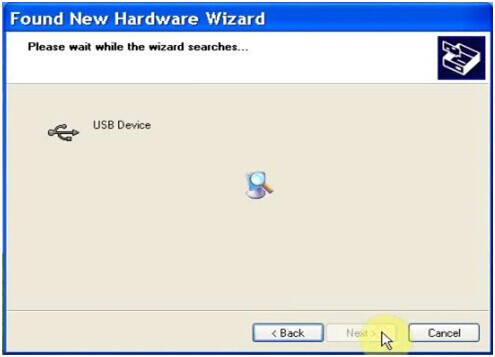
6. Connect KESS V2 device with PC, the PC will automatically come out Hardware Wizard Window asking for installation, easily complete via the prompts;


7. Check whether a good connection bewteen PC and KESS V2 device;


8. Run K-Suite Icon; the following part is some screen shots for Newest V2.13 KESS V2 Software:


How to Add Tokens for New V2.11 KESS V2

New V2.11 KESS V2 Unlimited Tokens Version is an ECU chip tuning tool that supports multi-function, like check battery voltage, automatic correction of checksum, DTC removal, reading and writing speed etc with multi-language.
Software Version: V2.11;
Hardware Version: V4.036;
Support System: Windows XP;
Here I would like to share the whole tutorial on how to add tokens for this new V2.11 KESS V2 device.
Note: Please disable both local area connection and wireless network connection, otherwise you will get the interface damaged!


Extract “Tool”Zip File;
Copy all the files under “Tool” Folder into desktop;
Copy “K-Suite_tokens” Zip File into Local Dick C, and to extract;


Run “K10033818 K2-TR ECU TUNERS”;
Click OK;


Browse the folder as Local Disk C:\KSuite tokens\KSuite;
Click OK;


Click “Rest Token Count”;


Click OK and then wait for loading;
Next close the window;
Delete previously extracted “K-Suite_tokens” Folder in the Local Disk C;
Re-extract “K-Suite_tokens” Zip File again;
Re-name “Token1.tok” on the desktop as “Token2.tok”;
Copy “Token2.tok” into “Tokens” Folder;


Open“K10033818 K2-TR ECU TUNERS” again;
Select location as Local Disk C:\KSuite tokens\KSuite again;
Click “Rest Token Count”;
Wait until the window below pop out;